Avoiding Waterfalls in React Server Components
React Server Components introduced a simpler way to do server side data fetching with just async/await, without relying on metaframework specific methods like Next.js's getServerSideProps.
const Post = async ({ id }) => {
  const post = await fetchPost(id);

  return (
    <>
      <h1>{post.title}</h1>

      <div>{post.content}</div>
    </>
  );
};
This method can introduce a footgun where you might accidently fetch resources sequentially.
import { getProduct, getPrice, getReviews } from "./data";

const ProductPage = async ({ id }) => {
  const product = await getProduct(id); // 1 second
  const price = await getPrice(id); // 3 seconds
  const reviews = await getReviews(id); // 5 seconds
  // Total time of 9 seconds

  return (
    <>
      <ProductDetails product={product} />
      <Price price={price} />
      <Reviews reviews={reviews} />
    </>
  );
};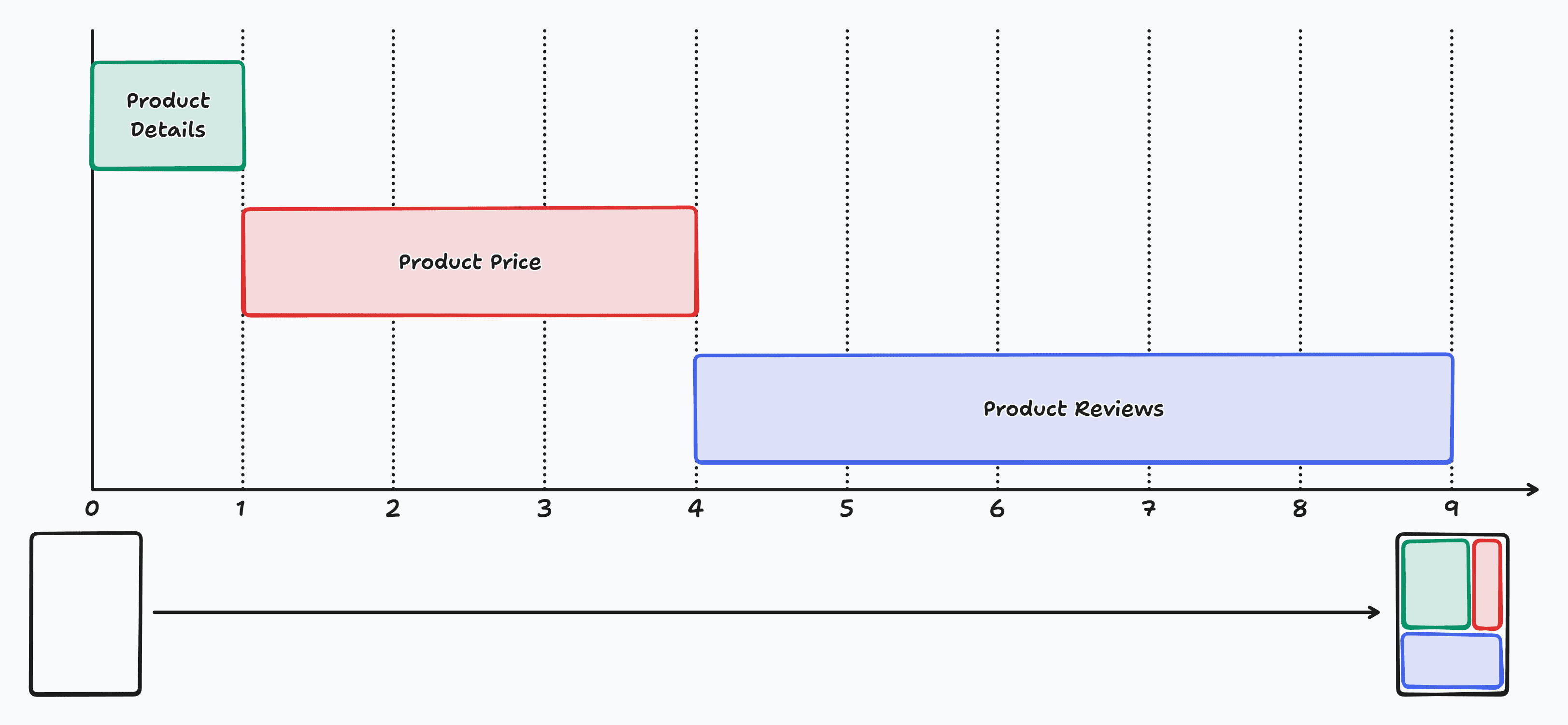

In the above example, the product page takes 9 seconds to render which isn't great for performance or user experience. To avoid this, the most obvious solution is to do all the fetches in parallel with Promise.all.
import { getProduct, getPrice, getReviews } from "./data";

const ProductPage = async ({ id }) => {
  const [product, price, reviews] = await Promise.all([
    getProduct(id), // 1 second
    getPrice(id), // 3 seconds
    getReviews(id), // 5 seconds
  ]);
  // Total time of 5 seconds

  return (
    <>
      <ProductDetails product={product} />
      <Price price={price} />
      <Reviews reviews={reviews} />
    </>
  );
};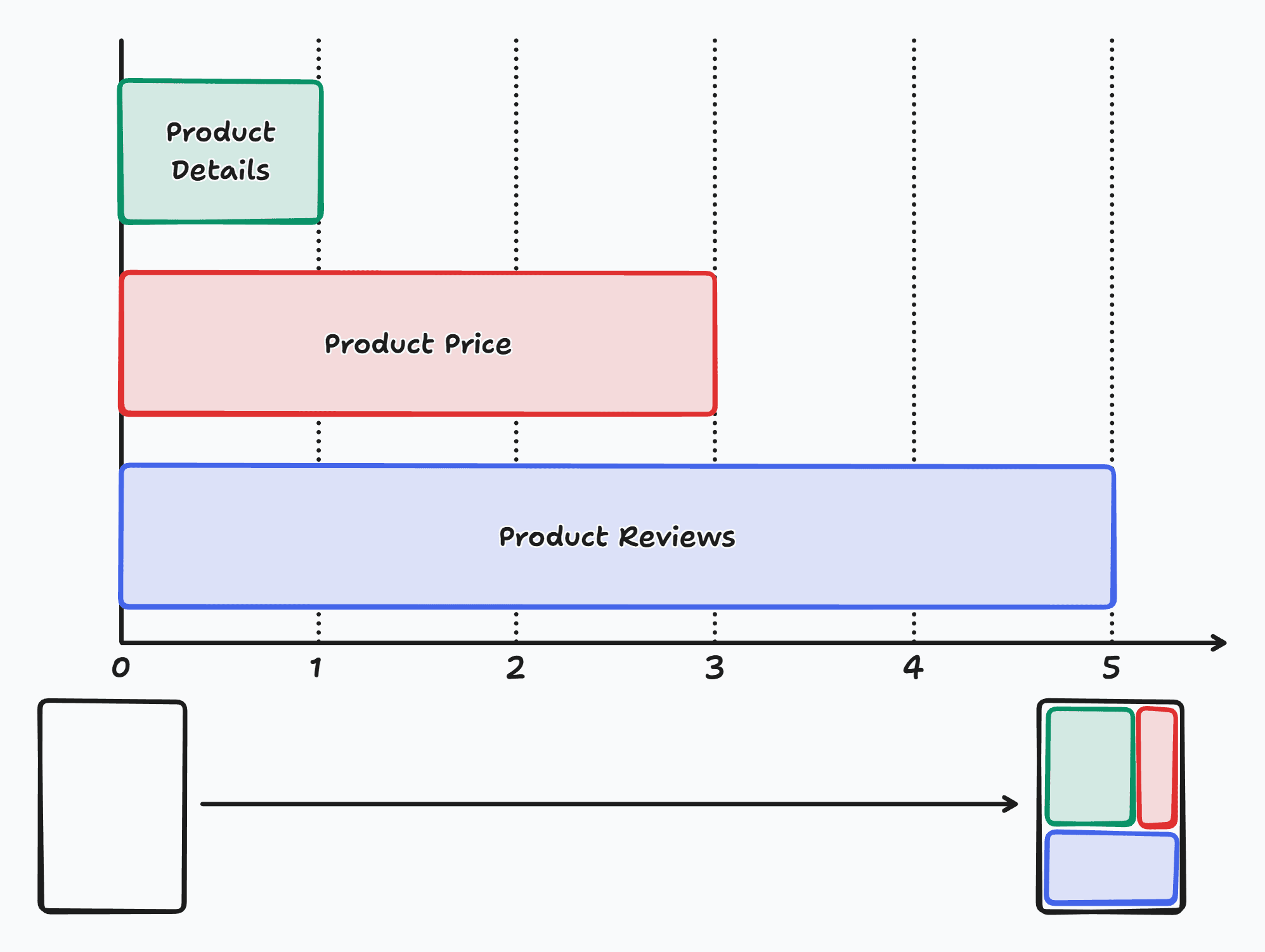

This is better because it reduces the time to render the page to 5 seconds but it still is not ideal because we still have to wait for all the resources to be fetched before the critical part of the page, the product details, can be viewed.
A solution to this is to use Suspense to wrap the Price and Comments components so that the product details can be rendered as soon as the product data is available, and the price and comments sections can be streamed in independently when they are done.
import { getProduct, getPrice, getReviews } from "./data";
import { Suspense } from "react";

const ProductPage = async ({ id }) => {
  const product = await getProduct(id);

  return (
    <>
      <ProductDetails product={product} />

      <Suspense fallback={<PriceFallback />}>
        <Price id={id} />
      </Suspense>

      <Suspense fallback={<ReviewsFallback />}>
        <Reviews id={id} />
      </Suspense>
    </>
  );
};

const Price = async ({ id }) => {
  const price = await getPrice(id);

  // ...
};

const Reviews = async ({ id }) => {
  const reviews = await getReviews(id);

  // ...
};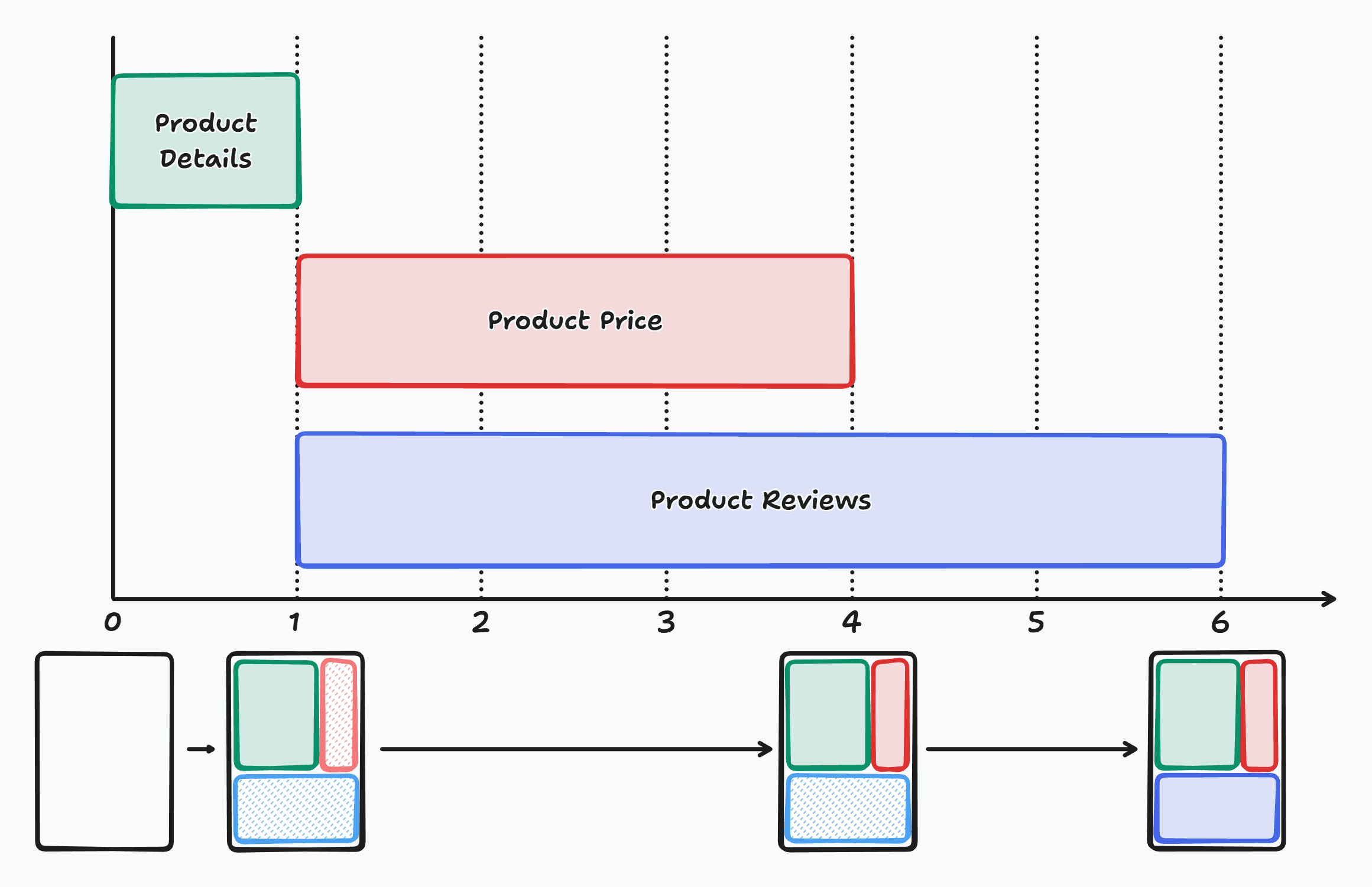

The example above is functional, but we can improve it even further. There is an issue in it where data fetching for the price and reviews start only after the product details have been fetched. The price section will show up after 4 seconds (1+3 seconds) and the reviews section will show up after 6 seconds (1+5 seconds), so the total time for the entire page is 6 seconds. Since the price and review sections have no dependency on the product details, it makes no sense to wait for it to complete. One cool thing about server components is that we can pass promises as props to child components, so we can start the fetch for the price and reviews at the parent component, ProductPage, and then consume the promises in their respective components, which are wrapped in Suspense so that they do not block the rendering of the product details.
import { getProduct, getPrice, getReviews } from "./data";
import { Suspense } from "react";

const ProductPage = async ({ id }) => {
  const [productPromise, pricePromise, reviewsPromise] = [
    getProduct(id),
    getPrice(id),
    getReviews(id),
  ];

  const product = await productPromise;

  return (
    <>
      <ProductDetails product={product} />

      <Suspense fallback={<PriceFallback />}>
        <Price pricePromise={pricePromise} />
      </Suspense>

      <Suspense fallback={<ReviewsFallback />}>
        <Reviews reviewsPromise={reviewsPromise} />
      </Suspense>
    </>
  );
};

const Price = async ({ pricePromise }) => {
  const price = await pricePromise;

  // ...
};

const Reviews = async ({ reviewsPromise }) => {
  const reviews = await reviewsPromise;

  // ...
};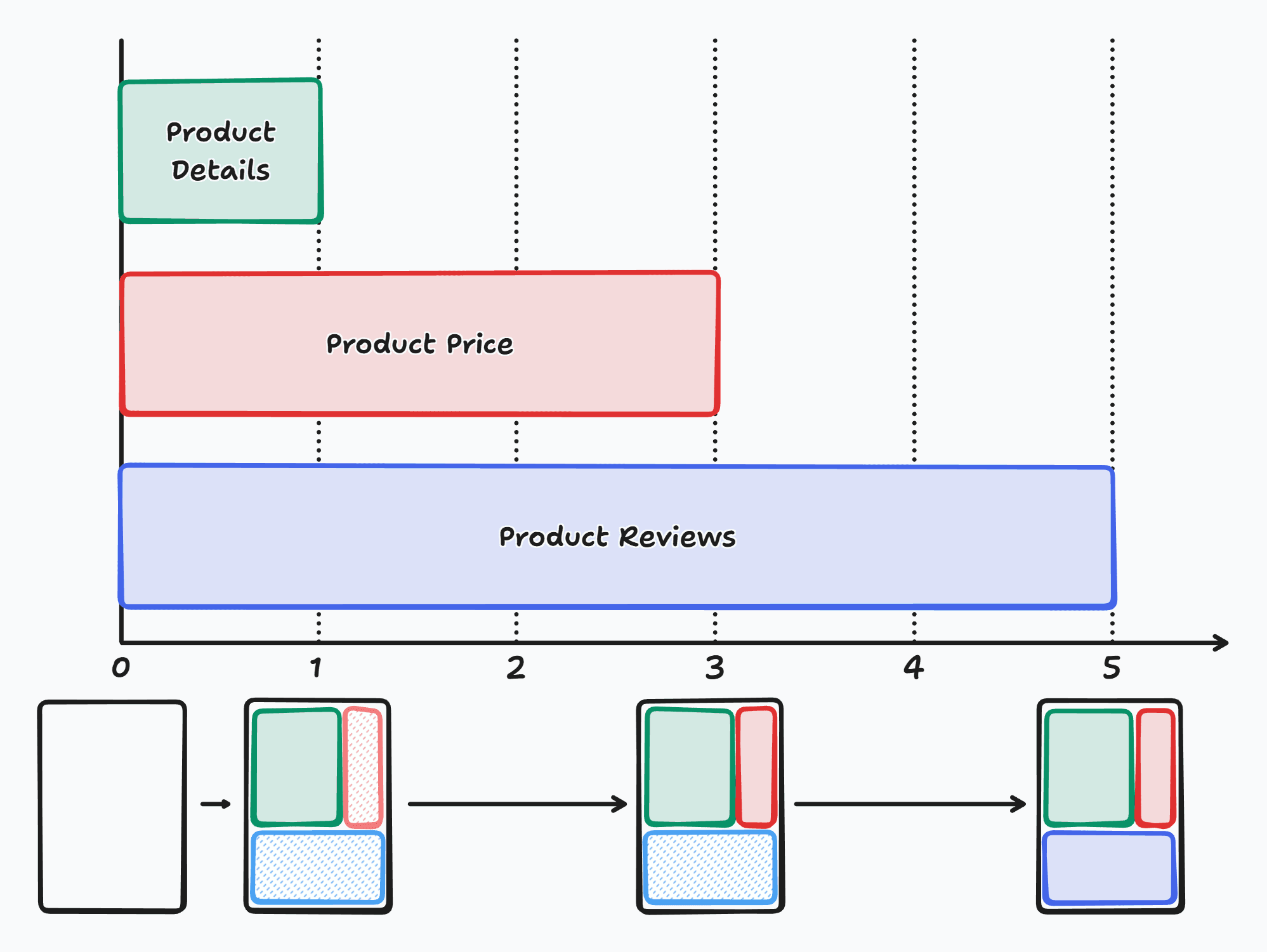

Since all data fetches start at the same time, the total time for the entire page is now down to 5 seconds. But unlike the Promise.all approach, we don't need to wait for the slowest fetch, getReviews, to complete to see anything. The product details will show up after 1 second, the price section will show up after 2 seconds, and the reviews after 5 seconds.
Promises can also be passed over the network into a client component so React has the use hook to consume promises in a client component. This can be used to avoid having to write another server component to await the promise before the client component.
import { getProduct, getPrice, getReviews } from "./data";
import Reviews from "./reviews";
import { Suspense } from "react";

const ProductPage = async ({ id }) => {
  const [productPromise, pricePromise, reviewsPromise] = [
    getProduct(id),
    getPrice(id),
    getReviews(id),
  ];

  const product = await productPromise;

  return (
    <>
      {/* ... */}

      <Suspense fallback={<ReviewsFallback />}>
        <Reviews reviewsPromise={reviewsPromise} />
      </Suspense>
    </>
  );
};
"use client";
import { use } from "react";
const Reviews = ({ reviewsPromise }) => {
const reviews = use(reviewsPromise);
// ...
};
export default Reviews;Conclusion
React Server Components make data fetching a lot simpler with async/await but it's easy to accidentally block the response from the server if the data fetches are done sequentially. The thing to keep in mind is, start any data fetches as soon as possible and consume the promise(data) down in the child component where it is needed, making sure it is wrapped in Suspense, so that you can progressively load the page improving performance and the user experience.